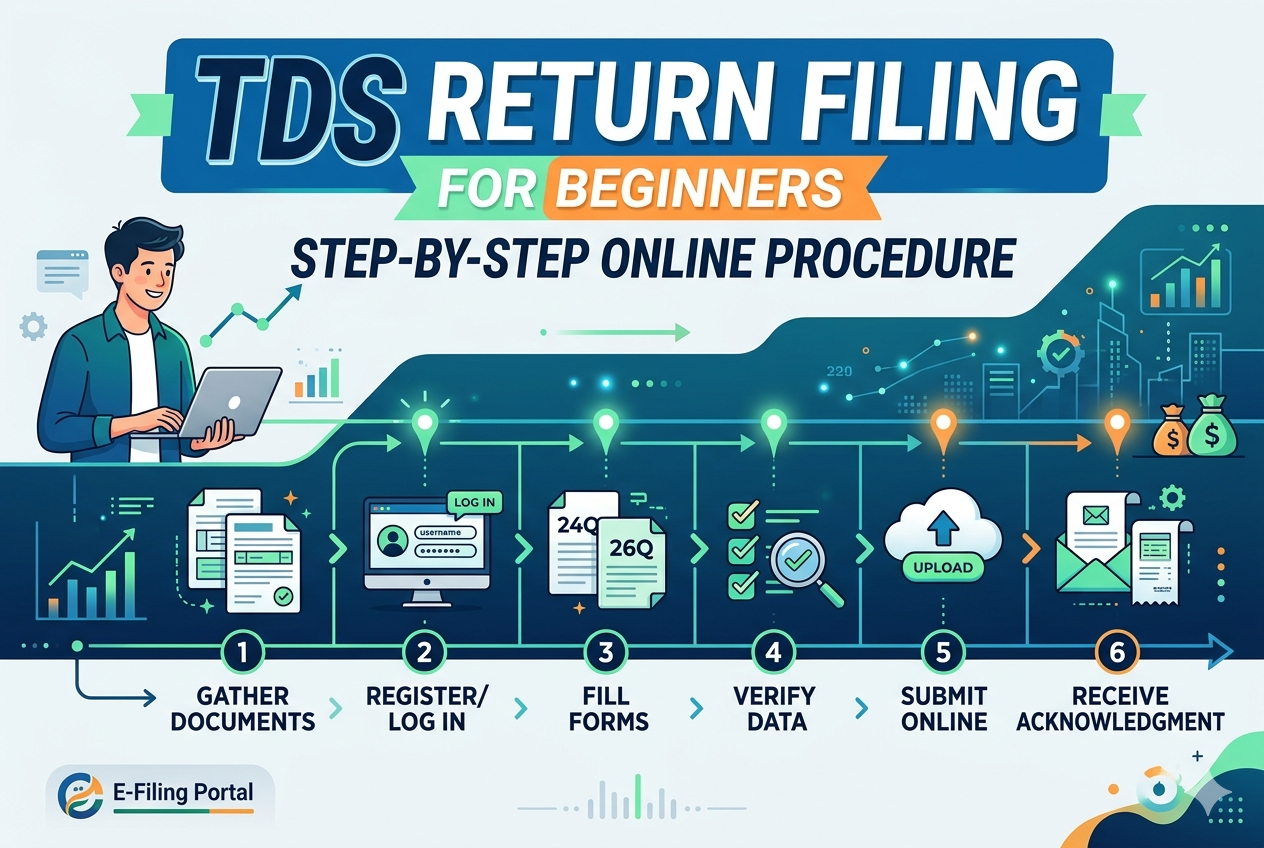

Navigating tax compliance can feel overwhelming, especially if you are managing a small business or working as an independent contractor. One of the most critical responsibilities for any deductor—someone who pays an amount and must deduct tax before releasing it—is submitting quarterly statements to the Income Tax Department (Prabha, 2026a).
If you are new to this, this comprehensive guide will break down the tds return filing online procedure into simple, actionable steps to help you master the tds return filing process india safely and efficiently.
Understanding TDS Returns: The Basics
Tax Deducted at Source (TDS) is a system where the person responsible for making specified payments (like salaries, professional fees, or rent) deducts a percentage of tax before making the payment and deposits it directly with the government (Prabha, 2026b).
Filing a TDS return is a quarterly obligation. Instead of treating it as an annual chore, the government requires quarterly summaries detailing how much tax you deducted from each payee (the “deductee”), when it was paid, and the specific transaction parameters (Prabha, 2026a).
Key Form Types to Know
Before starting, you must identify which quarterly form applies to your transactions:
- Form 24Q: For TDS on salary payments made to employees (Prabha, 2026a).
- Form 26Q: For TDS on all non-salary payments made to resident Indians, such as professional fees, commission, or contractor payments (Prabha, 2026a).
- Form 27Q: For TDS on payments made to non-residents or foreign companies (Prabha, 2026a).
Prerequisites Before You File
To ensure your filing session goes smoothly without errors, gather these essential items beforehand:
- A Valid TAN: You must possess a Tax Deduction and Collection Account Number (TAN). This 10-digit alphanumeric identifier is mandatory for all transactions (Prabha, 2026b).
- PAN of Deductees: Ensure you have verified, accurate Permanent Account Numbers (PAN) for all individuals or vendors you deducted tax from. Providing an invalid or missing PAN forces a steep penalty, triggering TDS rates as high as 20% (Prabha, 2026a).
- Challan 281 Details: When you deposit the monthly TDS collected via net banking or the portal, you receive a Challan receipt (Prabha, 2026a). You must have the BSR Code (a 7-digit bank branch identifier), Challan Serial Number, and the exact Date of Deposit handy (Prabha, 2026a).
Step-by-Step Online Procedure for TDS Return Filing
The tds return filing process india relies on a hybrid framework. You prepare and validate your data offline using free official utilities, then upload the structured file directly onto the centralized Income Tax e-Filing portal (Prabha, 2026a).
1. Download the Return Preparation Utility (RPU)
Visit the official Protean (formerly NSDL e-Gov) or Income Tax portal and download the latest version of the Return Preparation Utility (RPU). This offline tool provides a clean interface to input your transaction records safely without risking a live session timeout.
2. Input Deductor, Challan, and Payee Data
Open the RPU and select your respective form type (e.g., Form 26Q) and the relevant quarter. Carefully input your company’s TAN, details of the responsible person, and the 3 core challan elements: BSR code, serial number, and deposit date (Prabha, 2026a). Next, attach the corresponding payee lines, mapping each deductee’s PAN to the respective challan amount (Prabha, 2026a).
3. Validate Data with the File Validation Utility (FVU)
Once data entry is complete, run your file through the integrated File Validation Utility (FVU) (Prabha, 2026a). The FVU acts as an automated auditor, screening your data for common errors like mismatched challan amounts, duplicate entries, or structurally invalid PAN configurations (Prabha, 2026a). If errors are found, modify the source data in the RPU and re-validate.
4. Generate the Upload File
When your data successfully passes all validations, the FVU tool outputs a file with a .fvu extension (Prabha, 2026a). This encrypted, validated file format is the only type accepted by the e-Filing servers for your quarterly statement.
5. Upload to the Income Tax Portal
Log in to your account at incometax.gov.in using your TAN as the User ID (Prabha, 2026a). Navigate to e-File > Income Tax Forms > File Income Tax Forms (Prabha, 2026a). Select your form type, financial period, and upload your .fvu file directly into the designated slot (Prabha, 2026a).
6. Authenticate and Verify
To legally sign the return, authenticate the submission using either a Digital Signature Certificate (DSC) or an Electronic Verification Code (EVC) generated through your Aadhaar-linked mobile phone or corporate net banking account (Prabha, 2026a). After a successful handshake, download the tokenized acknowledgement receipt for your compliance records (Prabha, 2026a).
Crucial Timeline and Due Dates
To keep your business protected from unnecessary compliance expenses, maintain a strict calendar. TDS returns must be filed within 31 days from the end of each fiscal quarter, except for the final quarter (Prabha, 2026b).
| Quarter | Period Covered | Filing Due Date |
|---|---|---|
| Quarter 1 | April 1 – June 30 | July 31 |
| Quarter 2 | July 1 – September 30 | October 31 |
| Quarter 3 | October 1 – December 31 | January 31 |
| Quarter 4 | January 1 – March 31 | May 31 |
Pro-Tip on Vendor Invoices: Always request that your vendors explicitly itemize their base fees and GST as separate lines on their invoices. TDS applies exclusively to the base component; if the numbers are consolidated into a single bulk figure, you are legally forced to compute TDS on the entire amount, inflating your cash outflow unnecessarily (Prabha, 2026a).
Consequences of Delayed Compliance
Filing late triggers mandatory automatic financial penalties. Missing your deadline results in a flat late fee of ₹200 per day under Section 234E of the Income Tax Act (Prabha, 2026b). This fine continues accumulating daily until the total late fees match the exact amount of TDS deducted for that period.
Additionally, if you fail to file your statement within a year of the original due date, the tax department can initiate a separate penalty under Section 271H, ranging from ₹10,000 to ₹1,000,000.
Wrapping Up
Setting up a robust operational system makes Tds return filing online an routine, stress-free process. By utilizing verified tools like the RPU and FVU, checking payee PANs early, and tracking your quarterly timelines carefully, you can shield your business from penalties and maintain pristine regulatory standing (Prabha, 2026a, 2026b).